


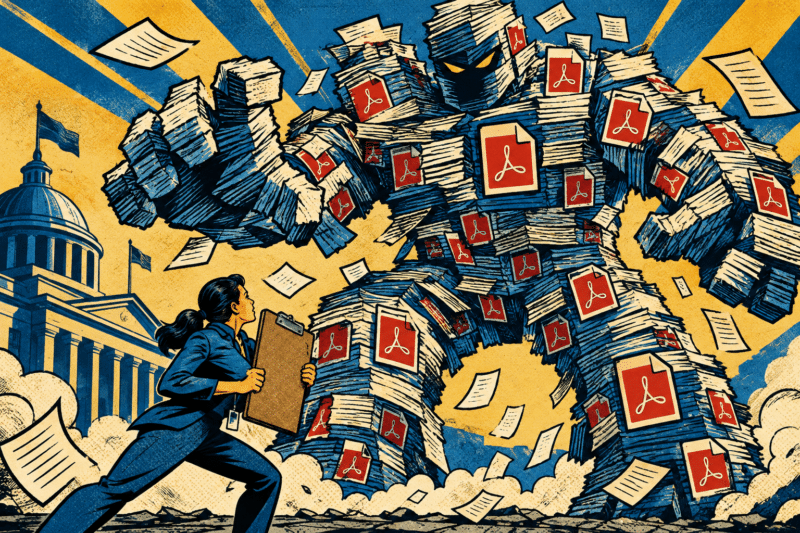
Ask five people at your agency how many PDFs are sitting on your website and you’ll get five different guesses. All of them will be low.
That number stopped being trivia in April 2024, when the DOJ finalized its ADA Title II rule. If you’re the ADA Coordinator, the number of PDFs on your site is the size of your compliance problem — and most of the hard ones are files nobody has looked at in years.
Nobody Knows the Number, and That’s Problem One
PDFs don’t arrive all at once. They show up one department at a time, one meeting agenda at a time, over fifteen or twenty years. Planning posts a permit application. The Clerk posts minutes. HR posts a benefits summary. Nobody deletes anything, because why would you.
Then the rule lands and every one of those files is web content that has to meet WCAG 2.1 Level AA. The DOJ pushed the dates back a year, so entities serving 50,000 or more people are looking at April 26, 2027, and everyone else — smaller municipalities and special districts — has until April 26, 2028. If you’re in the first group, that’s about eight months from now.
Here’s the practical piece: you cannot budget, staff, or schedule around a number you don’t have. Crawling your own site and getting a real count is the cheapest, fastest thing you can do this month, and it’s the thing that turns a vague dread into a scoped project. Most agencies who do it find several hundred to several thousand files. The count itself is often the argument that unlocks the funding.
A Scanned PDF Isn’t a Document. It’s a Picture of One.
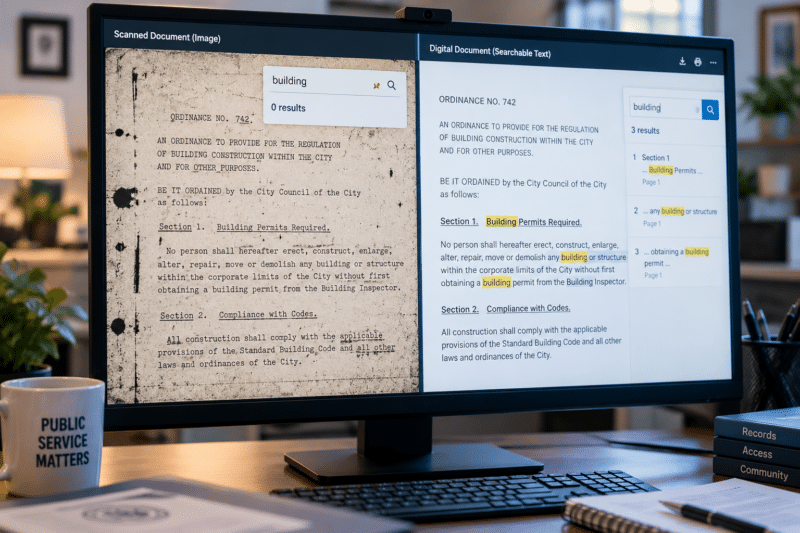
This is the part that surprises people, and it’s the difference between a two-month project and a two-year one. A PDF made from a scanner is an image. There’s no text inside it — just a photograph of a page, wrapped in a PDF container.
Think about taking a picture of your water bill and texting it to someone who asks what the leak cost you. They can see it. They can read it if their eyes work well and the photo’s in focus. But they can’t search it, copy a number out of it, or have their phone read it aloud. That’s exactly what a screen reader hits when it lands on a scanned PDF: nothing. No text, no headings, no reading order. Silence.
Anything that came off microfilm, microfiche, aperture cards, or a flatbed scanner and got saved straight to PDF falls in this bucket unless someone specifically ran OCR on it. Which means your oldest, most historically important records — the ones you were proudest to finally get online — are usually the least accessible files you own. They’re also the most expensive to fix, and they’re the ones nobody has opened in three years, so they never come up in a meeting.
“We Ran OCR, So We’re Covered” (Not Quite)
OCR is genuinely good and worth doing. It reads the image, finds the letters, and layers real text underneath the picture. Suddenly your file is searchable, Google can index it, and a screen reader gets words instead of silence. That’s a real step forward.
It’s just not the same thing as accessible. WCAG asks for structure: tagged headings so someone can jump between sections, a logical reading order, table headers that connect to their data cells, alt text on images, a document title, a declared language. OCR delivers none of that. It gives you a bucket of correct words in roughly the order they appeared on the page.
Picture handing someone every sentence from a book, but with no chapters, no page numbers, and no guarantee the sentences are in order. Someone reading with their eyes skims past the mess. Someone listening through a screen reader gets read a two-column form straight across, left column to right column, one line at a time — which turns a permit application into gibberish. Searchable is step one. It is not the finish line, and “we OCR’d everything” isn’t an answer you want to give an auditor.

This Lands on Records & Compliance, Not the Web Team
The most common way this goes sideways is the ADA Coordinator hands the whole thing to IT or the web team and assumes it’s handled. Those folks can absolutely fix the website — heading structure, color contrast, alt text on page images, keyboard navigation, form labels. That work is real and it’s theirs.
But nobody on the web team can fix a PDF that was never a document. Those files came from somewhere else entirely: a scanning project from 2012, a microfilm conversion, a clerk who hit “Print to PDF” on a form and dropped it in a folder. Fixing them means going back to how the records were captured and processed, and that’s a records conversation, not a web conversation.
So get the three of you in a room early — ADA Coordinator, records, and IT — and sort out who owns which pile. The web team owns the site. Records owns the documents. You own the deadline. That last one doesn’t move, which is why the meeting is worth scheduling before the budget cycle closes rather than after.

You Don’t Have to Boil the Ocean
Run the math on doing all of it and you’ll stop reading. Manual, page-by-page remediation runs roughly $5 to $25 a page depending on complexity, and scanned documents sit at the expensive end. Three thousand PDFs averaging twelve pages each is a number no county puts in a budget request without a fight.
So don’t do all of it at once. Count first, then triage:
- Pull the full inventory. Crawl the site and get every PDF URL in a spreadsheet.
- Check your analytics. You’ll find a long tail of files that got downloaded twice in four years.
- Retire what’s dead. Delete it, redirect the old URL, and it’s off your list permanently.
- Rank what’s left. Forms and applications the public has to fill out come first. Then notices, agendas, and anything tied to a public process. Reference material and archives come last.
- Fix the top slice and keep going.
Start with fifty files, not three thousand. The first batch teaches you what your documents actually look like — how many are scans, how many have tables, how bad the reading order is — and that tells you what the rest of the project really costs. Guessing at that number from a conference room is how projects get scoped wrong.
Just for fun, we reviewed five county websites and identified 1,414 public-facing PDF files on those sites. We then pulled a random sampling of 20 PDFs from each site, so a total of 60 PDFs, and tested them for accessibility.
How many do you think passed or failed?
Of those 60, 59 FAILED accessibility compliance.
Right away, that’s 4% of those five counties’ PDFs are out of compliance, and we barely scratched the surface.

What Automated Remediation Actually Does
This is where the tooling has changed enough to matter. BMI sells Accessibility on Demand, an automated remediation platform built by Netra Labs. You upload PDFs, pick a remediation level, and the files come back tagged — heading structure applied, logical reading order set, OCR run on the scans, metadata and language declared, alt text generated on images.
The part your auditor cares about is the compliance report. Every file comes back with a PAC-validated score, so you have documentation showing what you fixed and where it landed, rather than a hand-wave and a vendor invoice.
There are three levels, and picking the right one per document is most of the savings. Standard lands around 90%-plus and is fine for a 2019 meeting agenda nobody’s going to sue you over. Enhanced gets to roughly 95%-plus with better contextual alt text. Expert Review adds a human review and gets you to about 99%+, which is where you want your permit applications and anything a resident is legally required to use. Not every document needs the top tier, and treating them like they do is how the budget disappears.
The cost sits at a fraction of manual page-by-page work, and that’s the whole reason chip-away-at-it becomes a real plan instead of a nice idea. One more thing worth flagging: if the records are still on microfilm or in boxes, handle it once. Scanning, OCR, and accessibility remediation belong in the same pipeline — otherwise you’re paying to create next year’s compliance problem.
And the best part is that Accessibility on Demand is, well, on demand! You can start small and purchase a batch of credits, remediate the PDFs you need to do right away, and decide if you want to purchase more credits or call it done. You don’t have to spend a lot right away, but instead can take a steady approach.

Next Steps
Reach out to us today! Click the “Get Your Quote” button below, fill out the form, and we’ll quickly reply to you to discuss your project.
Further Reading
What Happens to Your Records During a Scanning Project?
Scanning rarely fails on hardware—it fails on planning. Here are four common mistakes and a simple, low-risk way to avoid them.
How Public Agencies Plan Digitization That Holds Up Under Audit
Digitizing records is only part of the process. This guide explains how public agencies plan digitization projects with the governance, documentation, and controls needed to stand up under audit.
Is Digitizing Your Records Actually Worth It?
Digitizing costs money up front, but hard copies cost you money every single day. Here are five real reasons converting your records pays off, and how to tell if it’s worth it for your organization.